

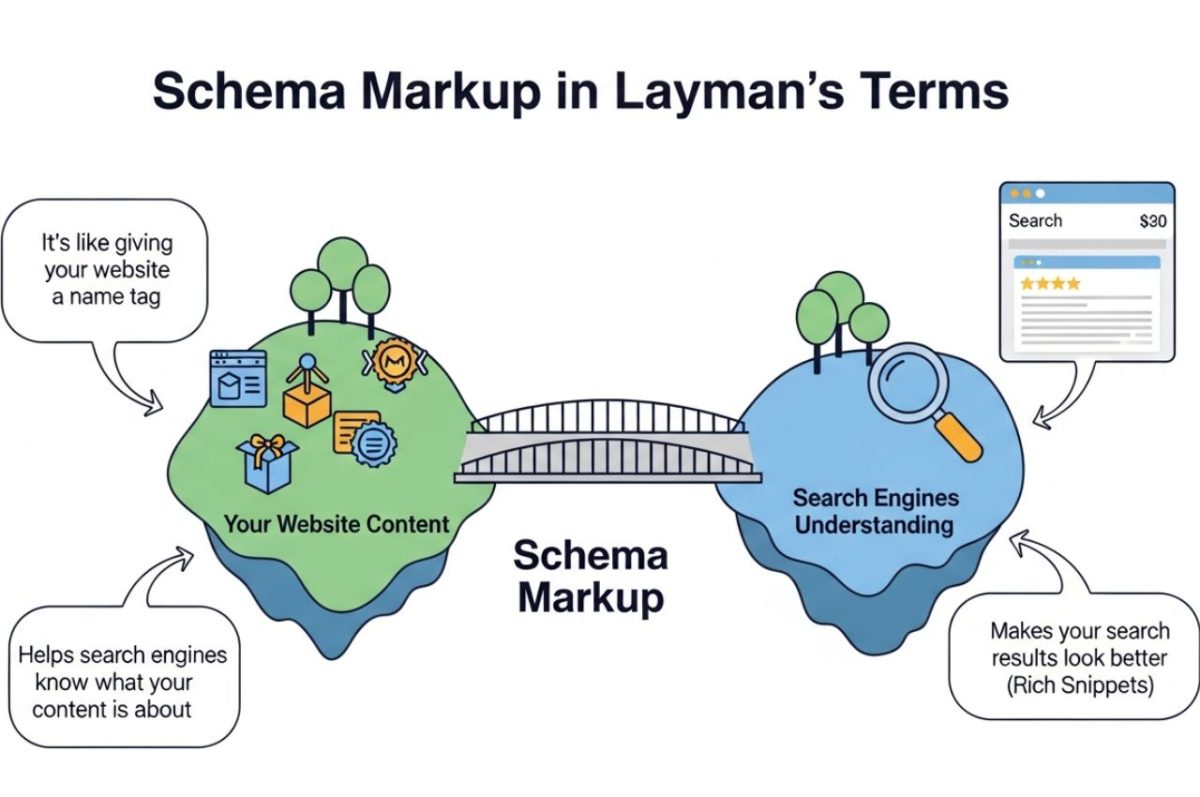
Have you ever searched for a recipe on Google and noticed results with star ratings, cooking time, and calorie counts displayed right on the search page? Or maybe you looked up a movie and instantly saw its release date, cast, and showtimes—without even clicking a link. That extra, eye-catching information isn’t a coincidence or magic. It’s powered by a powerful SEO tool called schema markup—and understanding what is schema markup in layman’s term can completely change how your content appears in search.
Now, if you’ve heard the term “schema markup” before and immediately thought it was some overly technical, developer-only feature, you’re not alone. It often sounds intimidating. But here’s the good news: it’s not nearly as complicated as it sounds. In fact, anyone—yes, even without a coding background—can learn how to use schema to boost their website’s visibility and performance in search engines.
In this article, we’ll strip away the jargon and explain schema markup in simple, everyday language. You’ll learn what it is, how it works behind the scenes, why it’s incredibly valuable for your SEO strategy, and most importantly, how you can start using it yourself.
By the time you finish reading, you’ll be equipped with the knowledge to help search engines better understand your content—leading to enhanced listings, more clicks, and a better overall experience for your audience.
Unpacking Schema Markup: The “What” and “Why”
So, what is schema markup in layman’s term? Imagine you hand a book to a friend. They can see the title on the cover, but they don’t know what it’s about, who wrote it, or what genre it is without opening it and reading. Now, imagine you hand them the same book with a little summary note attached. This note says: “This is a mystery novel by Agatha Christie, it has 300 pages, and readers give it 5 stars.” Your friend now understands the book instantly.
Schema markup is that summary note for search engines like Google, Bing, and Yahoo. It’s a special kind of code, a vocabulary, that you add to your website’s HTML. This code doesn’t change how your page looks to human visitors. Instead, it works behind the scenes, translating your content into a language that search engines can understand with perfect clarity.
Without schema, a search engine sees the number “4.5” on your product page and might not know what it means. Is it a price? A size? A version number? With schema markup, you can explicitly tell the search engine, “This ‘4.5’ is the average rating from 150 customer reviews.” This context is everything. It transforms your webpage from a simple block of text into a structured, meaningful piece of data.
The Secret Language of Search Engines
Search engines are incredibly smart, but they are still machines. They crawl billions of pages, trying to figure out what each one is about and how it relates to a user’s search query. While they are good at reading and indexing text, they sometimes need help understanding the context of that text.
For example, your website might have a page about the movie Avatar. The word “Avatar” could refer to the blockbuster film, a user’s profile picture on a forum, or a concept from Hindu philosophy. How does Google know you’re talking about the movie?
Schema markup removes this ambiguity. You can use a specific “Movie” schema type to label the title, director (James Cameron), genre (Science Fiction), and even the main characters. By providing this structured data, you are essentially having a direct, clear conversation with the search engine. You’re saying, “Hey Google, this page is not just about the word ‘Avatar’; it’s about the film ‘Avatar’.” This clarity allows search engines to serve your content to users with much greater confidence and precision.
How Schema Creates Rich Snippets (and Why You Want Them)
The most visible benefit of using schema markup is the creation of “rich snippets” or “rich results.” These are the enhanced, more detailed listings you see on search engine results pages (SERPs). They go beyond the standard blue link and black text description.
Examples of rich snippets include:
- Star ratings for products, recipes, or reviews.
- Event details showing dates, times, and locations.
- Recipe information with cooking times and nutritional facts.
- FAQ dropdowns that answer common questions directly in the search results.
- Article information that highlights the publisher and publication date.
These enhanced listings are incredibly valuable. According to one study, pages with rich snippets can see a click-through rate (CTR) increase of up to 30%. Why? Because they stand out. They provide immediate value and answer parts of the user’s query before they even click. A search result with a 5-star rating is more trustworthy and appealing than one without. A recipe that shows a 20-minute prep time is more likely to be clicked by someone in a hurry. Rich snippets give you a competitive edge on a crowded search results page.
The Big Three: Understanding Schema Markup Formats
While the “vocabulary” of schema comes from Schema.org, there are a few different ways, or “formats,” to write it into your website’s code. The three main formats are JSON-LD, Microdata, and RDFa. Don’t let the acronyms scare you; we’ll break them down simply.
1. JSON-LD (JavaScript Object Notation for Linked Data)
This is the format that Google recommends and, for most people, it’s the easiest one to use. Think of JSON-LD as a separate instruction block you add to your page’s HTML, usually in the <head> section. It doesn’t mix with your visible content, which makes it cleaner to manage and less likely to break your page’s layout.
It’s like writing your summary note on a separate sticky note and attaching it to the book. The note is part of the package but isn’t written directly on the pages of the book itself. This separation makes it simple to add, edit, or remove without touching the main content of your page. For beginners, JSON-LD is almost always the best choice.
2. Microdata
Microdata is an older format that involves adding schema tags directly into your existing HTML code. You “mark up” your content right where it lives. For example, if you have the name of a person written on your page, you would wrap it in specific Microdata tags to tell the search engine, “This text is a person’s name.”
Using our book analogy, this is like taking a highlighter and marking up the text directly in the book. You might highlight the author’s name and write “Author” in the margin. It works, but it can make the underlying HTML code look cluttered and can be more difficult for beginners to implement correctly.
3. RDFa (Resource Description Framework in Attributes)
RDFa is similar to Microdata in that it also adds attributes directly to your HTML tags. It’s an extension of HTML5 and was designed to support linked data. While it’s very powerful, it is also generally considered more complex than both JSON-LD and Microdata. For the average website owner or marketer, RDFa is often overkill and more complicated than necessary.
For our purposes, and for the sake of simplicity, we will focus on JSON-LD. It is the modern standard, preferred by Google, and the most straightforward path to implementing schema on your site.
Common Types of Schema Markup You Can Use Today
Schema.org provides a huge library of vocabulary—over 800 different types! You don’t need to know all of them. You just need to know the ones that are relevant to your content. Let’s look at some of the most common and useful schema types.
Article Schema
This is essential for blogs, news sites, and online magazines. It helps search engines understand that your content is an article. You can specify things like the author, publication date, headline, and a featured image. This can help your content appear in Google News and other article-specific carousels.
Organization Schema
This schema tells search engines about your company or organization. You can include your official name, logo, address, contact information, and social media profiles. This helps Google populate the Knowledge Panel—that box that sometimes appears on the right side of search results with key business information. It’s a great way to control your brand’s official presentation.
Local Business Schema
If you have a physical location like a restaurant, store, or doctor’s office, this schema is critical. You can specify your business hours, address, phone number, and type of business (e.g., “Restaurant,” “Dentist”). This information feeds directly into Google Maps and local search results, making it easier for customers to find you and visit.
Product & Offer Schema
For any e-commerce website, this is a must. Product schema allows you to mark up details like the product name, image, brand, and description. The Offer schema works with it to specify the price, currency, availability (e.g., “In Stock”), and condition (“New”). This is what generates the price and availability information you see in shopping results.
Recipe Schema
If you have a food blog, recipe schema is your best friend. You can mark up ingredients, step-by-step instructions, preparation time, cooking time, nutritional information (like calories), and user ratings. This is how you get those beautiful, detailed recipe cards in search results that attract hungry readers.
FAQ Schema
Do you have a Frequently Asked Questions page? Using FAQ schema, you can mark up your questions and answers. This can make them appear as interactive dropdowns directly in the search results under your main link. This not only saves the user a click but also establishes your page as an authority that directly answers their questions.
Event Schema
If you host events—whether concerts, webinars, or workshops—Event schema is invaluable. You can specify the event name, date, time, location (physical or virtual), and ticket information. Google often displays this in a special event box, making it easy for users to discover and attend your events.
A Step-by-Step Guide to Adding Schema Markup (JSON-LD Method)
Now for the practical part. How do you actually get this code onto your website? We’ll use the recommended JSON-LD method, which doesn’t require you to be a coding wizard.
Step 1: Identify the Right Schema Type
First, think about your page’s content. What is it? Is it a blog post? A product page? A recipe? Go to the Schema.org website and browse the list of commonly used types to find the one that best fits your content. Let’s use a simple “Article” schema as our example.
Step 2: Generate the Schema Markup
You don’t have to write the code from scratch! There are many free tools available that will generate the JSON-LD code for you. Google’s own Structured Data Markup Helper is a great place to start, as are tools like Merkle’s Schema Markup Generator.
Let’s use a generator. You would select “Article” and then fill in a form with your information:
- Article Headline: What is Schema Markup in Layman’s Term?
- Author: Your Name
- Publication Date: 2025-12-07
- Image URL: (A link to the article’s main image)
- Publisher Name: Your Website Name
- Publisher Logo URL: (A link to your site’s logo)
The tool will then produce a block of JSON-LD code that looks something like this:
<script type="application/ld+json">
{
  "@context": "https://schema.org",
  "@type": "Article",
  "headline": "What is Schema Markup in Layman's Term?",
  "author": {
    "@type": "Person",
    "name": "Your Name"
  },
  "datePublished": "2025-12-07",
  "image": "https://yourwebsite.com/image.jpg",
  "publisher": {
    "@type": "Organization",
    "name": "Your Website Name",
    "logo": {
      "@type": "ImageObject",
      "url": "https://yourwebsite.com/logo.jpg"
    }
  }
}
</script>
See? It’s just a structured list of your page’s information.
Step 3: Add the Code to Your Webpage
Now, you need to place this script into the HTML of your webpage. The best place to put it is in the <head> section. If you’re using a platform like WordPress, this is easier than it sounds.
- Using a Plugin: The simplest way is to use a WordPress plugin like Rank Math or Yoast SEO. These plugins have built-in sections for schema where you can either select the schema type and fill in the details directly, or paste your generated JSON-LD code into a custom code area.
- Manual Insertion: If you’re comfortable editing your site’s files, you can also add the code manually. Many WordPress themes have an option to insert scripts into the header. Alternatively, you can use a plugin like “Insert Headers and Footers” to paste the code without touching your theme files directly.
For other platforms like Shopify or Squarespace, they often have built-in SEO features or apps/extensions that handle schema for you, especially for common things like products and articles.
Step 4: Test and Validate Your Markup
This is a crucial step! You need to make sure you’ve implemented the schema correctly and that Google can read it. Fortunately, Google provides a free tool for this: the Rich Results Test.
- Go to the Rich Results Test tool.
- You can either paste the URL of the page where you added the schema or paste the code snippet directly.
- The tool will analyze your code and tell you if it’s valid. It will show you which rich result types were found and highlight any errors or warnings that need to be fixed.
Always test your markup before you move on. A small typo can make the entire block of code invalid, meaning search engines won’t be able to use it.
The Real-World Impact: Does Schema Actually Work?
At this point, you might be thinking, “This seems like a lot of effort. Is it really worth it?” The data and real-world examples overwhelmingly say yes.
One case study from Search Engine Land detailed how a company saw a 400% increase in organic traffic over 18 months after a comprehensive schema implementation. While schema wasn’t the only factor, it was a cornerstone of their SEO strategy that helped them dominate search results for their key terms.
Another example comes from the world of e-commerce. A retailer who added Product and Review schema to their pages saw a 15% increase in click-through rate. The star ratings and price information made their listings far more compelling than their competitors’ plain-text results.
The value isn’t just in direct traffic. Schema builds trust and authority. When a user sees an FAQ dropdown from your site answering their question directly in Google, they immediately view your brand as a helpful expert. When they see a 5-star rating on your product, their purchase anxiety decreases. Schema helps you win the user’s confidence before they even land on your website.
Avoiding Common Schema Mistakes
While implementing schema is more accessible than ever, there are a few common pitfalls to avoid.
- Using the Wrong Schema Type: Don’t try to force a schema type that doesn’t fit. For example, don’t use Recipe schema for a general blog post about cooking. Be accurate and honest. Misleading schema is a violation of Google’s guidelines and can lead to a manual penalty.
- Marking Up Invisible Content: The content you mark up with schema should be visible to users on the page. For example, if you add Review schema with a 5-star rating, those reviews should actually be present and visible on the page. Hiding marked-up content is a deceptive practice.
- Incomplete or Incorrect Information: A half-filled schema is less effective. Try to provide as much relevant information as possible. If you’re using Product schema, don’t just add the name. Add the price, availability, brand, and an image. Also, double-check for typos, especially in URLs or numerical values.
- Forgetting to Test: As mentioned before, always validate your code. It’s the only way to be sure that search engines can read and understand your hard work. Publishing broken schema is the same as publishing no schema at all.
The Future of Search is Structured
Schema markup is not just a passing SEO trend. It’s a fundamental part of how the modern web works. As search engines become more sophisticated and aim to provide direct answers rather than just links, structured data will become even more critical.
Voice search is a perfect example. When you ask Alexa or Google Assistant, “What’s a good recipe for lasagna?” the device doesn’t read you a list of ten blue links. It picks one recipe and starts reading the instructions. How does it pick? Often, it chooses a page that has clear, well-structured Recipe schema, allowing the AI to easily parse the ingredients and steps. Websites without schema will be left out of this conversational future.
By taking the time to add schema markup to your site, you are future-proofing your content. You are ensuring that your information is accessible not just to human readers, but to the growing army of bots, AI assistants, and intelligent agents that are shaping how we find and consume information.
FAQs
1. What is schema markup in layman’s term?
In simple terms, schema markup is like a set of “labels” you add to your website’s code. These labels are invisible to human visitors but act as a translator for search engines like Google. They explain what your content is about in a very clear, structured way. For example, instead of just seeing a number like “50,” schema can tell Google, “This ’50’ is the price in dollars for this specific product.” This helps Google show more detailed and useful information (like prices, ratings, or event dates) directly in the search results, which are called rich snippets.
2. What is the meaning of layman’s term?
“Layman’s term” means to explain a complex or technical subject using simple, everyday language that someone without any special knowledge of the topic can easily understand. A “layman” is a person who is not an expert in a particular field. So, when you explain something in layman’s terms, you are breaking it down and avoiding jargon to make it accessible to the average person.
3. Why is it called layman?
The word “layman” originates from the term “laity,” which historically referred to people who were not members of the clergy. In that context, a layman was someone who was not a religious professional or expert. Over time, the meaning expanded to its modern use, referring to anyone who is not an expert or professional in any given field, whether it’s medicine, law, science, or technology. So, it’s called “layman” because it describes a person outside the “inner circle” of professional expertise.
4. What is the synonym of layman?
Synonyms for “layman” include non-expert, non-specialist, amateur, and outsider. In a more casual context, you might refer to an “average person” or “person on the street.” The key idea behind all these terms is a lack of specialized or professional knowledge in a specific subject area.
5. What is a layman question?
A layman question is a question asked by someone who is not an expert on the topic. These questions are usually fundamental and seek a basic understanding of a subject. They often start with “What is…?” or “How does…?” and aim for a simple, clear explanation rather than a highly technical one. For example, “What does a computer’s CPU actually do?” is a layman question, whereas “What is the difference between the microarchitecture of a Zen 4 and a Raptor Lake CPU?” is an expert question.
Conclusion
We’ve covered a lot of ground, but the core message is simple: schema markup is a translator that helps search engines understand your content perfectly. It’s a way to add context, turning your text into structured data that powers the rich, helpful, and engaging search results users love.
This isn’t an obscure technical task for developers anymore. With user-friendly tools and plugins, anyone who manages a website can start implementing schema today. By doing so, you can improve your visibility, boost your click-through rates, and build authority in your niche.
Your action plan is clear:
- Audit your key pages: Identify your most important content (e.g., top blog posts, product pages, your homepage).
- Choose the right schema: Match each page to a relevant schema type (Article, Product, Local Business, etc.).
- Generate and implement: Use a tool to generate the JSON-LD code and add it to your site.
- Test and monitor: Validate your implementation with the Rich Results Test and keep an eye on your performance in Google Search Console.
Taking these steps will put you ahead of the curve, ensuring your website not only speaks to people but also communicates effectively with the search engines that connect you to them.