


HTTP response codes are one of those issues that many people grasp conceptually but underestimate in practice. They are just integers that a server sends back when a page is requested. In actual SEO work, they secretly regulate how search engines scan sites, how they decide what to index, and how they judge the quality of a site over time.
I regularly encounter sites with good content, good links, and a good structure that still have trouble being seen during audits. When you look into the problem deeply enough, response codes are usually involved. Pages show the wrong status. Redirects don’t always work the same way. Errors don’t happen all the time; they happen only sometimes. None of this is a big deal, but it makes it harder for search engines to work with the site.
HTTP response codes matter because they are the first signal Googlebot sees before it assesses content, links, or intent. If that signal is hard to understand or not reliable, everything that comes after it works less well. Crawling slows down, indexing becomes more picky, and trust slowly fades away.
This article talks about HTTP response codes from an SEO point of view, including what they really imply in the real world, how they effect crawling and indexing, and what faults keep coming up in audits.
How Search Engines Actually Use HTTP Response Codes
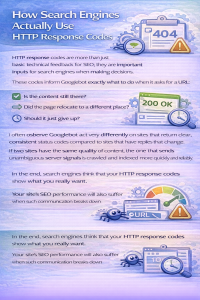
HTTP response codes are more than just basic technical feedback for SEO; they are important inputs for search engines when making decisions.
These codes inform Googlebot exactly what to do when it asks for a URL:
- Is the content still there?
- Did the page relocate to a different place?
- Should the crawler try again later?
- Should it just give up?
I often observe Googlebot act very differently on sites that return clear, consistent status codes compared to sites that have replies that change. If two sites have the same quality of content, the one that sends unambiguous server signals is crawled and indexed more quickly and reliably.
In the end, search engines think that your HTTP response codes show what you really want. Your site’s SEO performance will also suffer when such communication breaks down.
Understanding HTTP Response Code Categories (Without the Textbook Version)
Rather than listing codes mechanically, it’s more useful to understand how each category behaves in real SEO scenarios.
1xx Status Codes: Informational Responses
1xx responses are not common in SEO diagnostics because they are usually part of transitory server communication instead of definitive answers.
In real life:
- They don’t show up in Search Console
- They don’t immediately influence indexing.
- They frequently show the different levels of server configuration, like CDNs and proxies.
If you notice 1xx codes in crawl logs a lot, it’s usually an indicator that the infrastructure is complicated, not that there is an SEO problem.
2xx Status Codes: Successful Responses (Where SEO Should Live)
200 OK: The Ideal State
A 200 OK answer lets search engines know that
- The page is there
- The stuff is easy to get to.
- The URL can be indexed, as long as there are no additional signals that prohibit it.
You should only use 200 replies for pages you really want to get indexed in audits. One problem that keeps coming up is when sites return 200 for pages that shouldn’t exist, including expired listings, empty filters, or internal search results.
That makes things hard to understand. Google indexes content that appears like it is good but then later sees it as low quality or soft 404s.
Takeaway: Not every page that is accessible should get a 200 response.
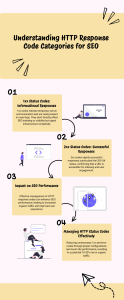
3xx Status Codes: Redirects and Their SEO Consequences
Redirects are necessary, but they’re also one of the most misused tools in SEO.
301 Permanent Redirects
301s signify a permanent move. When used appropriately, Google sends most signals.
When it comes to audits, 301s operate well when:
- There is a one-to-one redirect.
- Both URLs have the same goal.
- The length of the chain is rather short.
Problems happen when people utilize 301s to clean up instead of making a deliberate choice.
I’ve seen sites that have:
- Five-hop redirect chains
- Redirects that go to pages that aren’t relevant
- Old URLs kept sending people to the site.
All of these make crawling less effective and indexing less reliable.
302 Temporary Redirects
302s signify that a move is only for a short time.
When people misuse 302s, they do the following:
- Signal transfer that takes longer
- Uncertainty in indexing
- URLs that are old stay indexed for longer than they should
302s often show up in audits because of CMS defaults or plugin behavior, not because of what someone meant to do.
304 Not Modified
Caching behavior includes 304 answers. They aren’t wicked by nature.
But I’ve observed times when aggressive caching configurations returned 304s even if the content had changed, which delayed reprocessing and indexing updates.
This is a problem when search visibility depends on content updates.
4xx Status Codes: Client Errors That Affect Trust
404 Not Found
404s are not bad by themselves. They become a problem when:
- Links inside the site point to them.
- Important pages unintentionally return 404
- Large quantities stay the same over time
In audits, unanswered 404s are more likely to be linked to crawl inefficiency than to losses in ranking. Google keeps testing URLs that are no longer important.
410 Gone
410 alerts search engines that the page has been permanently deleted.
410s work great when you want to get rid of content on purpose. Google gets rid of these URLs faster than 404s.
I see people making the mistake of utilizing 410s on pages that still get search traffic or have link equity.
403 Forbidden and 401 Unauthorized
These codes are meant to keep others from getting in.
In SEO audits, they often show up by accident because of:
- Rules for safety
- Geo-blocking
- Authentication that isn’t set up right
If Googlebot keeps getting 403 errors, it will try to crawl less often.
429 Too Many Requests
This usually means that the rate is limited.
I’ve seen 429s show up on pages that have the following:
- Security settings that are too strict
- CDNs that aren’t set up correctly
- A lot of bot filtering
Frequent 429s slow down crawling and indexing from an SEO point of view.
5xx Status Codes: Server Errors That Quietly Kill SEO Momentum
5xx errors are among the most damaging issues when they persist.
500 Internal Server Error
500s often appear intermittently rather than permanently.
In audits, this inconsistency is worse than constant failure. Googlebot encounters unstable responses and reduces crawl trust.
502, 503, and 504 Errors
These usually mean that the server is overloaded or that there are problems upstream.
If they are planned and short-term, 503 replies can be okay. The difficulty comes up when they show up at random moments during peak crawl times.
I have seen indexing stop completely on sites that got 5xx issues when Googlebot visited them often.
What I Commonly See Go Wrong With HTTP Status Codes
In audits, this pattern keeps coming up:
- Pages giving a 200 response when they shouldn’t
- Redirects used instead of real deletions
- Different circumstances cause different response behaviors.
- Ignoring server problems that happen from time to time
- Looking at status codes as separate problems
Status codes don’t work by themselves. They affect the crawl budget, the order in which pages are indexed, and how reliable a site seems to be.
A Practical Diagnostic Framework for HTTP Response Codes
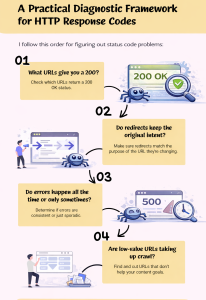
I follow this order for figuring out status code problems:
- What URLs give you a 200?
- Do redirects keep the original intent?
- Do errors happen all the time or only sometimes?
- Are low-value URLs taking up crawl?
- Do the responses from the server fit with the content strategy?
This stops people from treating symptoms instead of causes.
HTTP Response Codes and Indexing Signals
Search engines interpret response codes alongside:
-
Internal linking
-
Canonical tags
-
Content quality
-
Site structure
A correct status code cannot override weak content, but an incorrect status code can undermine strong content.
FAQs
1. Do HTTP response codes affect SEO?
Yes. They directly influence crawling, indexing, and how search engines interpret site reliability.
2. Is 404 bad for SEO?
No. Persistent or poorly managed 404s can affect crawl efficiency.
3. Should I always use 301 redirects?
Only when the move is permanent and intent matches.
4. Can server errors cause ranking drops?
Yes, especially when they occur repeatedly during crawls.
5. How often should status codes be audited?
Regularly—especially after site changes, migrations, or platform updates.
Conclusion
HTTP response codes are not usually the only thing that causes SEO difficulties, but they do change how all other signals are read. In real life SEO work, they have a bigger effect on crawl efficiency, indexing confidence, and long-term visibility than most people think.
In my experience, sites that manage response codes well tend to grow in a more predictable way. Pages get the status they deserve. Redirects keep the same meaning. Mistakes are planned, not random. Search engines may more easily figure out which URLs are important and how the site changes over time because of this uniformity.
HTTP response codes don’t have to be flawless in every way. It’s all about talking to each other. When your server answers make it apparent what each site is for and how it is doing; crawling and indexing go more smoothly. That clarity helps SEO results get better, even when content and algorithms change.