

A technical SEO audit matters most when things look almost fine. That’s the part most people overlook.
In real life, rankings don’t usually drop when a site is completely broken. They drop when Google starts having subtle problems — crawling slows down, indexing becomes selective, rendering shifts, or internal signals conflict. Over time, visibility quietly fades.
I’m Zohanuddin Shaikh, an SEO consultant based in Karachi, Pakistan, with 8 years of experience. I’ve seen this pattern repeatedly: pages stay indexed but stop performing, crawl numbers look “normal” yet key sections go stale, and content updates take longer to get picked up than they used to.
When that happens, changing the content won’t help. Building links won’t either. The problem is almost always technical — not in a dramatic way, but as an accumulation of small inefficiencies. A technical SEO audit is how you find those problems: not as a checklist task, but as a way to understand how search engines actually see your site today.
Technical SEO in 2026 isn’t about being flawless. It’s about making it easier for modern search engines to crawl, render, and evaluate your site’s relevance.
What a Technical SEO Audit Really Is
A technical SEO audit is not a tool export. Tools are something you use — the audit is the analysis.
In practice, a technical audit answers a few fundamental questions:
- Can search engines quickly find essential URLs?
- Can they consistently render and understand the content?
- Are resources being wasted on broken or low-value areas?
- Are performance, structure, and signaling working together—or against each other?
Context is what makes an audit useful instead of generic:
Context Factor |
Why It Matters |
|
Site size |
Larger sites have more crawl/index complexity |
|
CMS behavior |
How the platform generates URLs and templates |
| Publishing speed |
High volume creates more potential issues |
| Past SEO baggage |
Old redirects, leftover technical debt |
| Existing Google trust |
How Google already handles your domain |
A crawler can flag the same “issues” on two different sites—but only one of them may actually need fixing. That’s where real SEO experience comes in.
How I Approach a Technical SEO Audit
I don’t start with a list. I start with signals.
Step 1: Crawl Behavior before Page Speed
Before Core Web Vitals or schema, I look at:
- Crawl stats
- Index coverage patterns
- URL discovery paths
- How parameters behave
If crawl efficiency isn’t working, nothing else matters.
Step 2: Indexing Before Optimization
There’s no point optimizing pages that aren’t being indexed correctly. Indexing comes first.
Step 3: Performance in Context, Not Scores
A red Lighthouse score doesn’t automatically mean rankings will drop. More often, a change in performance does.
Step 4: Fix Problems, Not Symptoms
The most common technical SEO problems are conflicts:
Conflict |
What Happens |
|
JavaScript vs rendering |
Content loads inconsistently |
|
Speed vs content visibility |
Optimization hides important content |
| Canonical vs internal links |
Mixed signals confuse Google |
| CMS automation vs SEO goals |
Auto-generated URLs create bloat |
The audit’s job is to make those conflicts visible.
Crawlability: Where Most Technical SEO Problems Begin
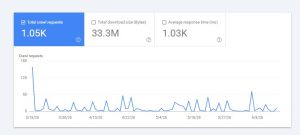
Crawlability problems rarely look dramatic. Google can usually crawl the page — just not efficiently.
Common crawlability problems I keep seeing:
- Important URLs hidden behind multiple redirect hops
- Endless parameter URLs consuming crawl budget
- Internal links built only with JavaScript
- XML sitemaps listing URLs the site itself barely links to
- Pagination structures that work in theory but hinder discovery
A pattern repeats again and again: sites that aggressively scale content tend to use internal search results, filters, or tag systems. Over time, this creates thousands of crawlable URLs that don’t help SEO at all.
Google doesn’t panic — it just starts prioritizing. And when it does, it doesn’t always pick your money pages.
For a useful diagnostic check, ask yourself:
- What pages would still be found if Google cut crawling in half?
- Do solid, crawlable HTML paths lead to essential URLs?
- Are internal links helping or hurting priority?
If you can’t answer those questions confidently, you need to work on crawlability.
Indexability: Why “Indexed” Doesn’t Mean “Healthy”
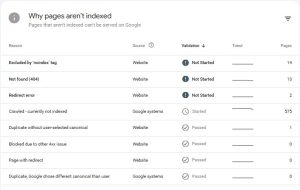
People often misunderstand indexability problems. Most sites don’t suffer mass deindexation—instead, they’re selectively ignored.
What I’ve seen across many audits:
- Pages indexed but not considered for ranking
- Duplicate clusters where the “wrong” version gets indexed
- Canonicals that are technically correct but ignored by Google
- Thin templates creating soft 404s
This frequently happens when signals disagree:
- The canonical points one direction
- Internal links point another
- The sitemap shows a third version
Google resolves the conflict — but not necessarily in your favor.
Indexability checks that matter:
- Are canonical URLs the ones receiving internal links?
- Do indexable pages consistently have the same HTTP status, content, and purpose?
- Are low-value URLs excluded on purpose, or just forgotten?
Indexability has less to do with tags and more to do with aligning signals.
JavaScript Rendering and Modern SEO Reality
JavaScript isn’t “bad for SEO” anymore — that argument is over. The actual challenge is making rendering predictable.
In audits, I typically find:
- Content added late in the rendering process
- No internal links in the original HTML
- Metadata overwritten after rendering
- Inconsistent loading of structured data
These don’t always block indexing — they make things less definite. And uncertainty makes updates take longer, makes content harder to understand, or causes rankings to fluctuate.
What I want to confirm in an audit:
- Is important content present in the first HTML response?
- Can internal links be seen without running JavaScript?
- Does the rendered content always match what users see?
If the answer is “usually,” that’s already a risk.
Core Web Vitals: Optimization without Breaking SEO
A Core Web Vitals assessment should never be done in isolation from SEO. I’ve seen sites improve LCP and CLS but lose traffic.
Why? Because:
- Lazy loading was applied to above-the-fold content
- Fonts were deferred incorrectly
- Content took longer to appear due to optimization
User experience matters for CWV, but content accessibility still matters for SEO.
My rules of thumb:
Do |
Don’t |
|
Look at field data trends |
Chase lab-perfect scores |
| Treat CWV fixes as experiments |
Assume fixes are permanent |
| Keep important content visible |
Hide content to improve scores |
Optimizing performance is a balancing act. Too much correction can actually hurt crawlability and relevance.
Mobile-Friendliness: Still a Source of Hidden Issues
Most websites work fine on mobile devices. That doesn’t mean mobile SEO is healthy.
Issues I still encounter:
- Mobile layouts that hide internal links
- Collapsed navigation that removes crawl paths
- Touch overlays that interfere with content display
- Different DOM structures for mobile and desktop
These differences matter more than before, because Google primarily evaluates the mobile version of your site.
Diagnostic mindsets—compare
- Mobile HTML vs desktop HTML
- Internal links present in each
- Content parity, not just visual parity
Google often sees less content than mobile users do, and that gap can quietly hurt rankings.
Structured Data and Schema: Useful, But Often Misused
A structured data audit usually isn’t about adding more schemas. It’s about getting it right.
Common Schema Problem |
Impact |
|
Invalid properties |
Markup fails validation |
|
Inconsistent markup across templates |
Confuses interpretation |
| Markup not matching visible content |
Risk of manual action |
| Outdated schema types |
No longer supported |
Schema won’t fix ranking problems, but broken schema can reduce trust. In several audits, simply fixing schema errors restored rich results—without adding anything new.
Practical tips:
- Use schema when it clearly clarifies what the page is about
- Remove old or duplicated markup
- Validate regularly, especially after CMS updates
Structured data shouldn’t add to reality — it should make it clearer.
XML Sitemap and Robots.txt Audits: Small Files, Big Consequences
A robots.txt audit and XML sitemap audit sound simple, but mistakes here compound quickly.
Issues I see repeatedly:
- Sitemaps listing redirected or canonicalized URLs
- Sitemaps being the only way orphaned URLs are discovered
- Robots’ rules blocking resources needed for rendering
- Old sitemap indexes never cleaned up
Sitemaps should reflect what SEO wants to achieve now — not what it did in the past.
A decision framework:
- Every URL in the sitemap should be indexable and supported within the site
- Robots.txt should block waste, not discovery
- If a URL shouldn’t rank, it probably shouldn’t be in the sitemap
What Commonly Goes Wrong in Technical SEO Audits
Across industries and site sizes, the same patterns repeat:
Recurring Issue |
Root Cause |
|
Over-engineered CMS setups |
Producing duplicate URLs |
|
Internal linking for UX only |
Not built for crawl logic |
| Global performance fixes |
Applied without testing SEO impact |
| Technical debt from old agencies |
Never cleaned up |
| “Set and forget” technical SEO |
Silently degrades over time |
The most damaging issues aren’t obvious errors — they’re slow drifts that accumulate unnoticed.
A Practical Technical SEO Audit Checklist
This checklist helps you make decisions — it doesn’t replace them.
Crawl and Discovery
- Check how deep internal links go to important pages
- Find crawl traps and parameter loops
- Confirm critical URLs are reachable without JavaScript
Indexability
- Check canonical consistency
- Look for patterns in excluded URLs
- Check status codes at scale
Rendering
- Compare raw HTML to rendered output
- Confirm links and content exist before rendering
Performance
- Look at CWV trends, not just scores
- Identify trade-offs your optimizations create
Mobile
- Confirm text and links match desktop
- Test how interaction elements impact rendering
Hygiene
- Clean sitemaps
- Audit robots’ rules
- Validate structured data
FAQs
1. What is a technical SEO audit?
A technical SEO audit evaluates how effectively search engines can crawl, render, index, and interpret a website. It focuses on site infrastructure — crawlability, indexing, rendering, performance, and signaling — rather than content quality or backlinks.
2. How often should a technical SEO audit be done?
For active websites, at least once or twice a year — and always after major changes such as redesigns, CMS migrations, or performance optimizations. Sites that publish frequently benefit from more regular checks, since technical issues accumulate faster.
3. Do small websites need technical SEO audits?
Yes, but the depth should match the site’s complexity. Even small sites develop crawl and indexation issues over time—orphaned pages, redirect chains, and thin templates appear regardless of size. A lighter audit is usually sufficient for smaller sites.
4. Are technical SEO issues always the reason rankings drop?
Not always, but they often amplify other problems. Technical friction can prevent good content from performing as expected. When rankings drop without an obvious content or link cause, technical issues are frequently involved—usually as accumulated small inefficiencies rather than one big error.
5. Can tools replace a manual technical SEO audit?
No. Tools surface data, but interpretation, prioritization, and context require human analysis and experience. The same crawler “issue” might be critical on one site and irrelevant on another. Tools tell you what exists; experience tells you what actually matters.
6. What’s the difference between a technical audit and a content audit? (H3)
A technical audit focuses on infrastructure—can search engines crawl, render, and index your site efficiently? A content audit focuses on the quality, relevance, and performance of the actual content. Both matter, but technical issues can prevent even excellent content from ranking, so technical audits often come first.
Final Thoughts
Technical optimization rarely produces quick wins in real SEO work. Its real value lies in removing resistance.
By eliminating technical problems, you make content easier to discover, signals easier to understand, and rankings more stable instead of constantly fluctuating. This allows SEO work to compound over time instead of stalling.
A technical SEO audit isn’t about chasing perfect scores or green checkmarks—it’s about finding and fixing structural problems that may be holding a site back without anyone realizing it.
In reality, the websites that keep growing aren’t always the ones that pass audits flawlessly. They’re the ones that actively find and fix the friction slowing them down. That’s how technical SEO really works.
For questions about auditing your own site, feel free to reach out through my Contact page.
For more SEO guides, browse Search Engine Realm.
Last Updated: June 2026