

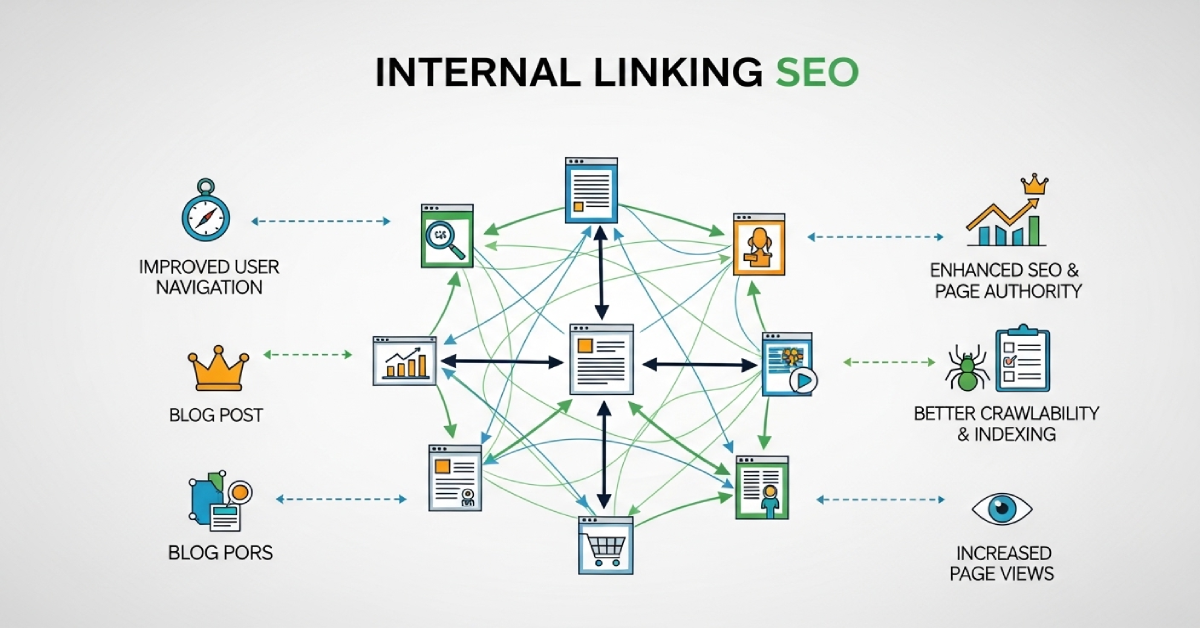
Internal linking SEO is one of the most powerful — yet least understood — parts of search engine optimization. Many websites have great content, follow on-page best practices, and even earn backlinks, but still struggle to rank consistently. In many of these cases, the real problem isn’t link building or content quality. It’s an internal link structure.
I’m Zohanuddin Shaikh, an SEO consultant based in Karachi, Pakistan, with 8 years of experience. In my work, internal linking problems rarely show up as obvious errors in SEO tools. Pages can be technically sound, crawlable, and indexable—yet still perform poorly if search engines can’t clearly understand what those pages are about, how important they are, or how they connect to each other.
Internal linking fills that gap. When it’s weak, inconsistent, or unstructured, search engines struggle to understand site hierarchy, topical relevance, and authority flow. This guide covers what internal linking SEO is, how search engines use internal links, common architecture problems, and how to fix them safely—to make your site easier to crawl, index, and rank over the long term.
What Is Internal Linking SEO?
Internal linking SEO is the practice of linking one page of a website to another page on the same domain, in a way that helps both users and search engines understand the site’s structure, page importance, and how authority flows between pages.
Unlike external backlinks—which you don’t fully control—internal links are entirely within the site owner’s control. This makes them one of the most reliable tools in SEO.
Search engines use internal links to:
- Discover new and updated pages
- Understand how topics relate to each other
- Determine which pages are most important
- Distribute authority and relevance across the site
Internal links also help users navigate content more easily, which improves usability, engagement, and content discovery — all signals that indirectly support SEO. Done well, internal linking serves users and search engines simultaneously.
Why Internal Linking SEO Is Critical (H2)
Search engines never rank pages in isolation. They view websites as connected, networked entities. Internal links provide the framework that lets search engines understand a site as a coherent whole rather than a collection of disconnected pages.
A strategic internal linking approach delivers several benefits:
Benefit |
What It Does |
|
Reduces crawl depth |
Important pages are easier to reach |
|
Improves indexing efficiency |
Search engines find content faster |
| Directs authority |
Critical URLs receive more link equity |
| Highlights topical clusters |
Demonstrates expertise in a subject |
| Supports site growth |
Structure scales as the site expands |
With poor internal link architecture, even excellent pages can be overlooked by search engines. The content might be outstanding, but if nothing links to it clearly, it struggles to rank.
How Search Engines Use Internal Links
Search engines use internal links as signals to evaluate four fundamental areas of a website.
Signal |
What Internal Links Reveal |
|
Page importance |
Pages with more (and higher-quality) internal links are seen as more important |
|
Topic associations |
Links help search engines recognize how content relates |
| Crawl paths |
Linking determines how crawlers move through the site |
| Authority flow |
Internal links direct where authority goes after external links arrive |
In simple terms, internal linking is communication. Every link tells search engines something about the relationship between two pages, the importance of the destination, and the topic they share. Inconsistent linking can create crawl traps or send too much attention to irrelevant pages — while strategic linking guides search engines exactly where you want them.
Common Internal Linking SEO Problems
Across real audits, the same internal linking architecture problems appear repeatedly.
1. Orphan Pages
Orphan pages are pages with no internal links pointing to them. They’re difficult for search engines to find, carry zero internal authority, and generally perform poorly. Orphan pages are surprisingly common, and they often contribute directly to weak ranking performance — sometimes the page is fine, but nothing connects to it.
2. Excessive Crawl Depth
Pages four or more clicks away from the homepage get crawled less often. Deep pages tend to have poor SEO performance, get updated late in search results, and are deprioritized by crawlers. Strategic internal linking brings important pages closer to the surface.
3. Overlinking Low-Value Pages
Many sites accidentally prioritize internal links to tag/archive pages, login or account pages, filtered URLs, and legal or utility pages. This bleeds authority away from the pages that actually matter for SEO. Every link to a low-value page is authority not flowing to an important one.
4. Inconsistent Anchor Text
Anchor text helps search engines understand what a linked page is about. Problems arise when anchor text is too vague (like “click here”), when writers use random anchors with no topical connection, or when exact-match keywords are overused. Balanced, descriptive anchor text improves clarity and builds trust.
5. Broken Internal Linking Logic
Internal links break for many reasons: URLs change, pages get deleted, CMS settings update, or plugins misconfigure. Broken internal linking disrupts site structure and wastes crawl budget, making it harder for search engines to navigate and understand the site.
Internal Linking SEO and Crawl Budget
Internal linking plays a key role in how efficiently search engines crawl your website. When your linking structure isn’t optimized, crawlers may keep revisiting low-value pages, important pages get crawled less frequently, and your crawl budget ends up wasted.
A strong internal linking strategy guides search engines toward your most valuable pages, improving both visibility and overall site performance. This is especially important for larger sites, where crawl budget is finite and easily wasted on unimportant URLs. For a deeper process, see my technical SEO audit guide.
Internal Linking SEO and Indexing Issues
Many indexing problems aren’t caused by poor content—they’re often the result of gaps in internal linking. You might notice signs like the following:
- New pages taking longer to get indexed
- Pages suddenly disappearing from the index
- Similar content being indexed inconsistently
Internal links signal which pages matter most, helping search engines decide what to index first. When a page has strong internal links pointing to it, search engines discover and index it faster. When it’s poorly linked or orphaned, indexing becomes slow and unreliable.
Internal Linking SEO vs External Backlinks
These two link types serve different but complementary roles.
Factor |
Internal Links |
External Backlinks |
|
Control |
Full control | Limited control |
|
Primary role |
Direct authority flow |
Build authority |
| Source | Your own site |
Other websites |
| Best for | Distributing link equity |
Earning link equity |
External backlinks build your site’s authority; internal linking directs how that authority flows across your pages. Without a solid internal linking strategy, backlink value stays trapped on a few pages, supporting pages struggle to gain strength, and topic clusters don’t fully develop. Effective internal linking channels backlink authority where it matters most—turning it into ranking power across the whole site.
Internal Linking SEO and Topical Authority
Search engines assess your site’s topical authority as a whole, not page by page. Internal linking strengthens this by connecting related content, reinforcing topic relevance, and pointing attention toward key pillar pages.
Without proper internal links, topic clusters feel disconnected and fail to demonstrate real depth or expertise. The pillar-cluster model only works when internal links actually connect the pieces. For more on building this, see my topical authority guide.
Internal Linking SEO and Page Hierarchy
A clear site structure makes it easier for search engines to understand which pages matter most. A well-organized hierarchy typically looks like this:
- The homepage links to key pillar pages
- Pillar pages connect to related cluster articles
- Cluster articles link to supporting content
When links are added randomly without a clear structure, this hierarchy breaks down and weakens overall SEO signals. A logical hierarchy isn’t just good for crawlers — it helps users understand where they are and what to read next.
Internal Linking SEO and JavaScript Rendering
Internal links that rely on JavaScript aren’t always dependable. Problems arise when links only appear after a user action, are hidden within scripts, or load late during rendering. In these cases, search engines may miss or ignore the links entirely.
The fix is straightforward: include important internal links directly in the page’s HTML so search engines can access them easily during crawling. If a link only exists after JavaScript runs, treat it as a link that might never be seen by a crawler.
How to Diagnose Internal Linking SEO Issues
A systematic diagnosis reveals internal linking problems before they harm rankings.
Method |
What to Look For |
|
Crawl analysis |
Orphan pages, deeply buried content, overlinked low-value pages |
| Google Search Console |
How pages are crawled, what’s indexed, importance distribution |
| Manual structure review |
Map your structure from the homepage outward |
While tools help surface data, applying clear logic and structure matters even more. The best diagnostic question is simple: starting from the homepage, how many clicks does it take to reach my most important pages? If the answer is four or more, you have a crawl depth problem.
How to Fix Internal Linking Issues Safely
Step 1: Identify Priority Pages
Start by focusing on pages that bring in traffic, cover your main topics, and deliver real business value. These deserve the strongest internal linking.
Step 2: Build Pillar-Cluster Links
Create clear connections between pillar pages, related cluster content, and supporting articles. Every supporting article should link to its pillar, and the pillar should link out to its clusters.
Step 3: Reduce Crawl Depth
Make your most important pages easier to reach by linking them closer to the homepage and other high-authority pages. Aim to keep key pages within three clicks of the homepage.
Step 4: Optimize Anchor Text
Use natural, relevant anchor text that reflects the topic, while keeping some variation to avoid repetition. Descriptive anchors help users and search engines alike.
Step 5: Limit Low-Value Links
Reduce links pointing to less important pages — utility pages, duplicate archives, or parameter URLs. This preserves authority for pages that actually drive results.
Internal Linking and User Experience
Strong internal linking doesn’t just help SEO — it improves the user experience by making navigation smoother, increasing engagement, encouraging visitors to spend more time on your site, and helping users discover relevant content.
These positive interactions send strong signals to search engines, supporting better long-term SEO performance. This is the key insight: internal linking should be built for users first. When a link genuinely helps a reader find their next useful page, it also happens to be exactly what search engines reward. User-focused linking and SEO-effective linking are usually the same thing.
Internal Linking and Site Scalability
As websites expand, internal linking problems tend to multiply. Without a clear strategy, new content competes with older pages, crawling becomes less efficient, and authority spreads too thin across the site.
To scale effectively, internal linking needs proper planning and regular reviews. A site with 50 pages can manage linking informally; a site with 500 pages needs a deliberate system. Planning your linking structure early prevents expensive restructuring later. This connects closely to content planning—see my SEO content planning approach for more.
Internal Linking and E-E-A-T
Internal linking helps strengthen E-E-A-T (Experience, Expertise, Authoritativeness, Trustworthiness) by connecting expert content, drawing attention to authoritative pages, reinforcing trust signals across the site, and showcasing depth of experience.
When your content lacks clear connections, it weakens how search engines and users perceive your expertise. A well-linked cluster of related, in-depth content signals genuine authority on a topic — far more than isolated pages ever could, no matter how good each one is individually.
FAQs
1. What is internal linking SEO?
Internal linking SEO is the practice of linking pages within your own website to help search engines understand the site’s structure, page importance, and how authority flows between pages. Unlike backlinks from other sites, internal links are fully within your control, making them one of the most reliable SEO tools available.
2. Can poor internal linking hurt rankings?
Yes. Poor internal linking makes it harder for search engines to crawl your site, delays indexing, and weakens how authority flows across your pages. Even high-quality content can underperform if it’s orphaned or buried deep in the site with weak internal links pointing to it.
3. How many internal links should a page have?
There’s no fixed number. The key is to keep links relevant, logical, and helpful for users. A long, comprehensive article naturally supports more internal links than a short page. Focus on quality and relevance rather than hitting a specific count—every link should genuinely help the reader or clarify site structure.
4. Do internal links help new pages rank faster?
Yes. Strong internal linking makes it easier for search engines to discover and index new content more quickly. When you publish a new page and link to it from established, frequently crawled pages, search engines find and index it faster than if it were orphaned or weakly linked.
5. Should internal links use exact-match anchor text?
Anchor text should be descriptive and natural, reflecting what the linked page is about. Overusing exact-match keyword anchors can look manipulative and do more harm than good. Use a natural mix—descriptive phrases that vary slightly while still clearly indicating the destination page’s topic.
6. What is an orphan page in SEO?
An orphan page is a page that has no internal links pointing to it from anywhere else on the site. Orphan pages are hard for search engines to discover, carry no internal authority, and typically perform poorly. Finding and linking orphan pages from relevant content is one of the highest-impact internal linking fixes.
7. What’s the difference between internal links and backlinks?
Internal links connect pages within the same website and direct how authority flows across your site — you control these completely. Backlinks come from other websites and build your site’s overall authority — you have limited control over these. Both matter: backlinks earn authority, and internal links distribute it where it’s needed.
8. How often should I review my internal linking?
Internal linking isn’t a one-time task — it’s an ongoing process. Run regular audits, update links as your site evolves, expand content strategically, and maintain a consistent, logical structure. For active sites, a quarterly internal linking review works well, with additional checks after major content additions or site restructuring.
Final Thoughts
Internal linking isn’t about adding links randomly — it’s about creating a clear, logical structure that both users and search engines can follow.
When your internal linking is weak, SEO performance becomes inconsistent, even if your content is high quality. In practice, fixing internal linking often leads to noticeable improvements without needing new content or backlinks. Pages become easier to crawl, indexing becomes more stable, and authority flows more effectively across the site.
In modern SEO, structure is strategy — and internal linking is what holds that structure together. The websites that treat internal linking as a fundamental part of their architecture, rather than an afterthought, are far more likely to achieve lasting search success.
Most importantly, build your internal linking for users first. When a link genuinely helps a reader find their next useful page, it’s almost always the same link that strengthens your SEO. That alignment between user value and search performance is what makes internal linking so powerful.
For questions about improving your site’s internal linking, feel free to reach out through my Contact page.
For more SEO guides, browse Search Engine Realm.
Last Updated: June 2026