

A lot of SEO stacks are full these days. Everyone has a dozen tabs open for crawlers, rank trackers, log analyzers, and content tools. But when anything goes wrong at a basic level, I still go back to Google’s top 3 SEO tools: Lighthouse, PageSpeed Insights, and Safe Browsing.
Not because they look good. Because they show how Google really rates webpages.
In real-world audits, these technologies always find flaws that keyword reports and ranking monitors don’t show. These are the kinds of problems where rankings stop moving higher even when the material seems good, or where traffic slowly drops without a clear change or penalty to point to. Performance problems, UX issues, and trust signals that aren’t as strong as they used to be don’t usually set off alarms on their own, but they build up over time and slowly make things less visible.
It’s also vital to know that these tools don’t work on their own. They all show three main ways that Google rates a site: whether it can be used correctly, if it works well for actual people, and if it is secure and reliable enough to suggest. SEO performance gets weak when even one of those levels begins to fall apart. I’ve seen technically powerful sites fail because they didn’t pay enough attention to one of these signs for too long.
Google’s SEO toolkit isn’t about advice—it’s about signals
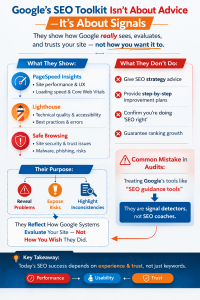
One mistake I see a lot in audits is thinking that Google’s top 3 SEO tools are search engines. No, they’re not. They don’t exist to help with strategy or recommend improvements in a nice, step-by-step fashion. They work like reflectors for signals. Their job is to show you how Google systems really see and rate your site, not how you want them to.
You can’t learn how to “do SEO” from Lighthouse, PageSpeed Insights, or Safe Browsing. They show how Google sees your sites in terms of how they are displayed, how they are used, and how much they trust them. That’s why their work may sometimes seem harsh, incomplete, or even unjust. These tools aren’t meant to make site owners feel better or prove that they’re working hard; they’re meant to show problems, risks, and inconsistencies.
I frequently say this in audits: third-party tools act like they are doing SEO. It shows in Google’s top 3 SEO tools. That difference is important, particularly in today’s SEO, since changes in rankings are small, happen over time, and are more based on experience and trust than just matching keywords.
Lighthouse: what it really tells you in SEO audits

Lighthouse is often described as a performance or UX tool, but in practice, it’s closer to a diagnostic lens for how Google interprets page quality.
What Lighthouse is actually good at:
In actual audits, Lighthouse helps find:
- Behaviour that blocks rendering
- Delays in running JavaScript
- Unstable layout
- Accessibility problems that make things harder to use
- Basic mistakes in SEO settings
The SEO aspect itself isn’t always the most helpful part. Usually, the performance and UX indicators convey a far greater picture.
I’ve seen sites with “green” SEO tests that nevertheless didn’t rank well because they were too long to load on mid-range mobile devices. Lighthouse showed that long before the rankings changed.
Where Lighthouse can mislead
Lighthouse works in a controlled setting. That means:
- Small modifications might make scores go up and down a lot.
- Lab data doesn’t always mirror what actual users do.
- Getting over a certain point doesn’t mean your rating will go up.
One problem I see all the time is teams trying to get a perfect Lighthouse score instead of figuring out why a measure isn’t working. SEO doesn’t reward being flawless. It encourages getting rid of friction where it really bothers consumers.
PageSpeed Insights: performance through Google’s eyes
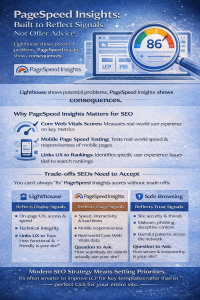
If Lighthouse shows potential problems, PageSpeed Insights shows consequences.
The key difference is that PageSpeed Insights blends lab data with real-world performance data. That makes it one of the most honest Google tools available—also one of the most uncomfortable.
Why PageSpeed Insights matters for SEO
PageSpeed Insights links right to:
- Measurement of Core Web Vitals
- Testing the speed of mobile pages
- UX cues linked to systems of ranking
In real life, this instrument answers an important question:
- Are genuine users really having a nice time?
I have checked out sites where the Lighthouse scores were OK, but PageSpeed Insights found problems that kept happening in real-world data. The rankings didn’t drop overnight, but they did progressively go down, particularly on mobile.
Trade-offs SEOs need to accept:
You can’t always “fix” PageSpeed Insights without making it worse:
- Scores are affected by third-party scripts.
- Ad tech adds variety
- CMS limitations make optimisation harder
Here, modern SEO strategy is all about setting priorities. It’s frequently more important to make LCP better for important templates than to try to make CLS flawless for the whole site.
Safe Browsing: the SEO tool people forget until it hurts
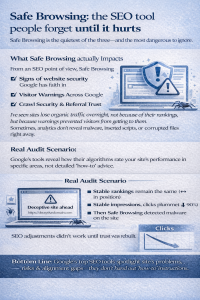
Safe Browsing is the quietest of the three—and the most dangerous to ignore.
What Safe Browsing actually impacts
From an SEO point of view, Safe Browsing has an effect on:
- Signs of website security Google has faith in
- Warnings for users in search and browsers
- Crawl safety and faith in referrals
I’ve seen sites lose organic traffic overnight, not because of their rankings, but because warnings prevented visitors from getting to them. Sometimes, analytics don’t reveal malware, inserted scripts, or corrupted files right away.
Real audit scenario
In one audit, the ranks stayed the same, the crawl numbers seemed okay, but the number of organic clicks went down a lot. It wasn’t SEO that was the problem; it was a phishing script that was added via an old plugin. The domain was reported by Safe Browsing. The number of impressions in Search Console remains the same. Clicks fell apart.
SEO adjustments didn’t work until trust was rebuilt.
How these tools connect to modern SEO ranking systems
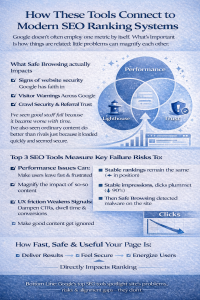
Google doesn’t often employ one metric by itself. What’s important is how things are related.
- Problems with performance make bad content worse.
- Warnings about security take precedence over relevance
- UX friction makes engagement signals weaker.
I’ve seen good stuff fail because it became worse with time. I’ve also seen ordinary content do better than rivals just because it loaded quickly and seemed secure.
This is why the Top 3 SEO Tools from Google are important. They stand for performance, experience, and trust, which are the three pillars of current SEO.
What commonly goes wrong (from real audits)
1. Treating tools as checklists
Passing scores doesn’t equal competitiveness. Context matters.
2. Ignoring template-level issues
Fixing one page rarely helps if templates are broken.
3. Chasing lab scores over real users
PageSpeed Insights field data matters more than Lighthouse lab scores.
4. Forgetting security after launch
Safe browsing issues often come from neglected maintenance, not bad intent.
A practical diagnostic framework I use
When I think my SEO performance is unsteady, I check the following:
- Lighthouse: Are there any problems with rendering or interaction?
- PageSpeed Insights: Do actual people agree that those are problems?
- Safe Browsing: Is trust still there?
- Crawl logs: Is Google continuously reaching important URLs?
- Rankings: Are losses grouped by device or template?
In most cases, this narrows down the issue quicker than keyword analysis.
Where these tools fit in modern SEO for 2026
As search systems evolve, these tools become more—not less—important. AI-driven ranking systems still rely on:
-
Usable pages
-
Predictable performance
-
Safe destinations
Modern SEO tools by Google reflect that reality. They don’t replace advanced platforms, but they anchor your understanding in how Google actually experiences your site.
FAQs
1. Are Lighthouse scores direct ranking factors?
No. They indicate issues that influence ranking systems indirectly.
2. Which tool from Google’s top 3 SEO tools is most essential for SEO?
It depends. Performance issues show in PageSpeed Insights, trust issues in Safe Browsing, and structural issues in Lighthouse.
3. Can you rank with poor PageSpeed scores?
Sometimes, but it becomes harder in competitive spaces.
4. Does Safe Browsing affect indexing?
Not directly, but it affects user access and trust, which impacts performance.
5. Are Google’s top 3 SEO tools enough to replace third-party SEO tools?
No. They complement them by showing Google-native signals.
Conclusion
The fact that Google doesn’t give shortcuts with its top three SEO tools is what makes them so useful. Instead of being optimization playbooks, they are reality checks. Lighthouse shows you friction that you may not have seen before, such as sluggish rendering, unstable layouts, and delayed interactions. PageSpeed Insights tells you whether that friction is really bothering a lot of real people, not only in the lab or in rare circumstances. Safe Browsing brings attention to danger, the type that may destroy confidence and traffic overnight, even while rankings stay the same.
You might start to see trends when you look at these tools all at once. When you look for sites that seem weak, they generally aren’t failing because of one big fault. They’re building up minor problems—like performance debt, bad user experience, old plugins, or security holes—that slowly lower people’s trust. Some sites stay steady not because they are perfectly optimized, but because they always reduce friction and avoid taking needless risks. That discrepancy becomes bigger with time.
It’s not about taking advantage of holes in algorithms or going for short-term successes. Those methods tend to fail when things change quickly. Building sites that Google can crawl, render, and promote without hesitation is the key to long-term success. Lighthouse, PageSpeed Insights, and Safe Browsing won’t perform that job for you, and they won’t ensure that your site will rank. What they do provide you is clarity. They show you where your site causes uncertainty, friction, or risk and where you should put your energy to enhance long-term search stability.