

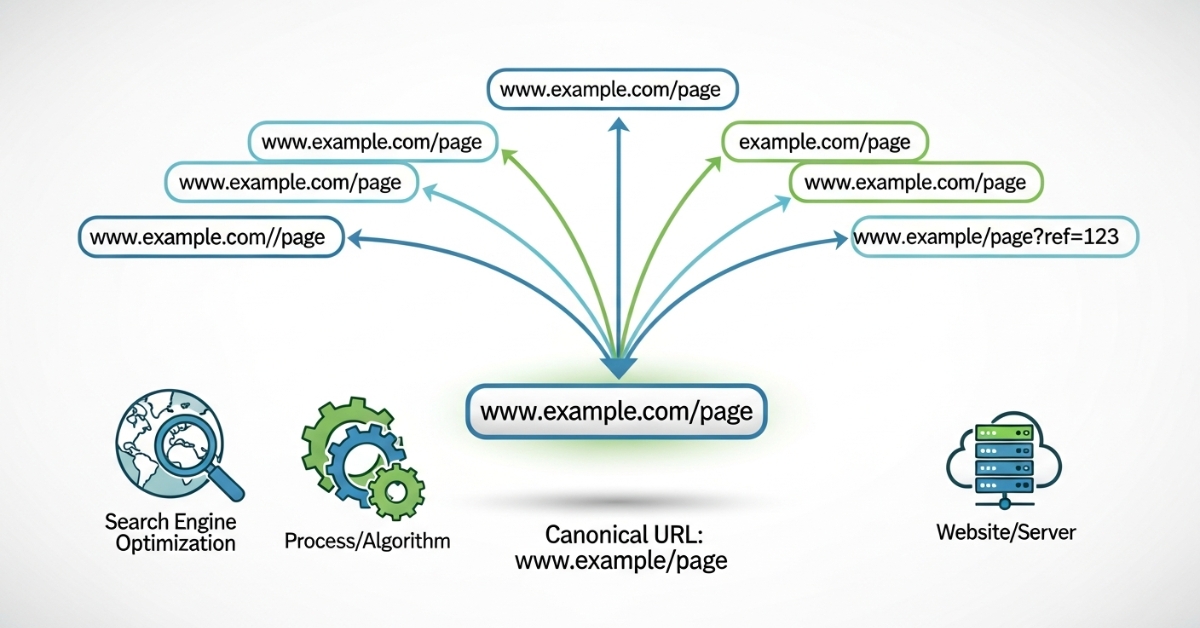
Canonicalization SEO is one of the most misunderstood parts of technical SEO. Many websites unintentionally send search engines mixed signals about which version of a page should be indexed and ranked. As a result, good content underperforms, rankings fluctuate, and indexing becomes unpredictable.
I’m Zohanuddin Shaikh, an SEO consultant based in Karachi, Pakistan, with 8 years of experience. In my work, canonicalization problems rarely show up as obvious errors. Pages load normally, content looks correct, and there are no front-end warnings. But behind the scenes, search engines may be splitting ranking signals across multiple URLs—or sending them to the wrong version entirely. This makes canonicalization a quiet but critically important SEO issue.
This guide explains what canonicalization SEO is, why it matters, how canonical problems happen, and how to fix them safely without harming long-term visibility.
What Is Canonicalization in SEO?
Canonicalization SEO is the process of telling search engines which version of a page is the preferred (canonical) version when multiple URLs contain the same or very similar content.
Search engines encounter duplicate or near-duplicate content far more often than most site owners realize. Duplication can happen because of:
- URL parameters
- Pagination
- Session IDs
- HTTP vs HTTPS
- WWW vs non-WWW
- CMS-generated URLs
- Tracking tags
Canonicalization consolidates ranking signals by pointing all these copies to one official URL. Instead of spreading authority across several versions of the same page, it concentrates that authority on the version you actually want to rank.
Why Canonicalization SEO Matters
Search engines try not to show the same content multiple times in search results. When they find more than one version of the same content, they must decide:
- Which version to index
- Which version to rank
- How to distribute ranking signals
If canonical signals are unclear or conflicting, search engines may pick the wrong URL, split link equity across versions, ignore your preferred page, or delay indexing.
Canonicalization SEO ensures your site’s structure is clear and consistent, helping search engines interpret it correctly. The goal is simple: remove the guesswork so search engines confidently rank the right page. For the broader technical picture, see my technical SEO audit guide.
How Search Engines Handle Duplicate URLs
Having multiple URLs doesn’t mean search engines will penalize your site. Instead, they attempt to canonicalize the URLs themselves—but automatic canonicalization isn’t always correct.
Search engines use many signals to choose a canonical version:
Signal |
What It Tells Search Engines |
|
Canonical tags |
Your explicitly preferred URL |
|
Internal links |
Which version you link to most |
| Sitemap URLs |
Which URLs you consider important |
| Redirects |
Which versions should be consolidated? |
| URL structure |
Which version looks primary |
When these signals disagree, search engines may ignore your canonical hints entirely and choose their own preferred version — which may not be the one you want. Consistency across all signals is what makes canonicalization work.
Common Causes of Canonicalization Problems
Understanding what creates duplicate URLs is the first step to fixing them.
-
Multiple URL Variations
A single page may be accessible through several URLs: http://example.com/page, https://example.com/page, https://www.example.com/page, https://example.com/page/, and https://example.com/page?ref=tracking. Without proper canonicalization, search engines treat these as separate pages.
-
URL Parameters
Filters, sorting options, and tracking parameters generate multiple URL versions — like ?sort=price, ?utm_source=email, or ?sessionid=123. These usually show identical content but confuse search engines into seeing distinct pages.
-
CMS and Plugin Behavior
Content management systems create duplicates through category and tag archives, author pages, attachment pages, and pagination URLs. When CMS defaults aren’t reviewed, canonicalization problems quietly appear.
-
Pagination Conflicts
When category pages repeat product listings or posts across pages, paginated pages may share content across multiple URLs. Without correct canonical handling, search engines may index deeper pages instead of the primary category page. This connects to my pagination and infinite scroll guide.
The Canonical Tag Explained
The canonical tag is an HTML element placed in the <head> section of a page:
html
<link rel=”canonical” href=”https://example.com/preferred-page/” />
It tells search engines: “This URL represents the primary version of this content.”
Three important points about canonical tags:
Point |
What It Means |
|
They’re hints, not directives |
Search engines can choose to ignore them |
| Conflicting signals override them |
If other signals disagree, canonicals get ignored |
| They must point to indexable URLs |
Canonicals should never point to noindex or redirected pages |
Understanding that canonical tags are hints — not commands — is essential. They work only when all your other signals (internal links, sitemaps, and redirects) agree with them.
Self-Referencing Canonicals
A self-referencing canonical is a canonical tag that points a page to itself, explicitly confirming it as the preferred URL.
html
<link rel=”canonical” href=”https://example.com/page/” />
Self-referencing canonicals reduce ambiguity, reinforce URL consistency, and prevent accidental duplication. In my experience, missing self-referencing canons are a common cause of indexing instability—pages flicker in and out of the index because search engines aren’t sure which version is preferred.
The best practice is simple: every indexable page should have a self-referencing canonical that confirms its own URL as the primary version.
Canonicalization SEO vs Redirects
Canonical tags and redirects serve distinct purposes, and using the wrong one causes problems.
Factor |
Canonical Tag |
301 Redirect |
|
When to use |
Multiple URLs must coexist | Duplication isn’t needed |
|
User access |
Users can still reach all versions |
Users are sent to one version |
| Effect | Consolidates ranking signals |
Removes alternate URLs entirely |
| Best for | Filtered/parameter URLs that serve users |
Permanently moved or merged pages |
Use canonical tags when multiple URLs need to remain accessible to users (like filtered product views). Use 301 redirects when alternate URLs serve no purpose and should be eliminated. Mixing these up — like redirecting URLs users actually need, or canonicalizing pages that should be removed — creates problems.
Common Canonicalization SEO Mistakes
Mistake |
Why It Hurts |
|
Canonicalizing to non-indexable pages |
Sends conflicting signals (noindex, redirected, or error pages) |
|
Cross-domain canonical errors |
Can transfer authority away from your site |
| Canonical chains |
A→B and B→C reduces clarity and weakens signals |
| Inconsistent canonical signals |
Tags, links, and sitemaps pointing to different URLs get all ignored |
The most common and damaging mistake is inconsistency. When your canonical tags say one thing, your internal links say another, and your sitemap says a third, search engines often ignore all of them and choose their own canonical—defeating the entire purpose.
Canonicalization SEO and Internal Linking
Internal links play a major role in canonical selection. Search engines pay close attention to which URLs you link to most frequently.
Best practices for internal linking and canonicalization:
- Always link to canonical URLs within your site
- Never link to parameter versions of pages
- Use consistent URL formatting everywhere
Internal linking inconsistencies often override canonical tags. If your canonical tag points to one URL but all your internal links point to another, search engines may trust the links over the tag. For a complete process, see my internal linking SEO guide.
Canonicalization SEO and XML Sitemaps
Only canonical URLs should appear in your XML sitemaps. Adding non-canonical URLs confuses search engines, weakens canonical signals, and slows indexing.
Your sitemap should support your canonical strategy, not contradict it. If your sitemap lists https://example.com/page?ref=tracking while your canonical points to https://example.com/page/, you’re sending conflicting signals. A clean sitemap containing only canonical, indexable URLs reinforces your preferred versions and helps search engines index efficiently.
Canonicalization SEO and Indexing Issues
Many “Crawled – currently not indexed” cases trace back to canonical ambiguity. When search engines see identical content, conflicting canonicals, and weak preference signals, they may delay indexing or drop URLs entirely.
Canonical clarity makes indexing more efficient. When search engines can confidently identify the preferred version, they index it faster and more reliably. When they can’t, pages get stuck in indexing limbo. This connects closely to crawl budget and JavaScript rendering as causes of indexing delays—see my crawl budget guide for a related issue.
How Canonicalization SEO Affects Rankings
Canonicalization doesn’t directly improve rankings. Instead, it strengthens rankings indirectly by:
- Consolidating link equity onto one URL
- Preventing signal dilution across duplicates
- Making crawling more efficient
- Keeping indexing stable
These effects compound over time to make rankings stronger and more stable. Think of it this way: if your page’s authority is split across five duplicate URLs, no single version is as strong as it could be. Canonicalization combines that authority into one powerful page — which competes far better than five weak ones.
Canonicalization SEO on Large Websites
Large websites are more prone to canonical problems because URLs change rapidly, filters create thousands of duplicates, and there’s limited manual control.
Enterprise-level canonicalization requires:
Requirement |
Purpose |
|
URL parameter management |
Control filter/sort duplicates |
| Controlled internal linking |
Consistent links to canonical URLs |
| Consistent CMS rules |
Prevent auto-generated duplicates |
Without proper canonicalization, large sites can experience severely slow and inefficient crawling and indexing. On a site with thousands of pages, canonical problems multiply quickly—making this one of the highest-priority technical fixes for large sites.
Canonicalization SEO and International Websites
International websites often face canonical problems involving hreflang tags, country-specific URLs, and multiple languages.
The key principle: unless content is identical across countries, canonical tags should generally point to the same-language version, not a global page. Canonical and hreflang must work together carefully — incorrect canonicalization can undermine your hreflang setup, causing the wrong regional version to rank. For international sites, canonical and hreflang strategy should be planned together, not separately.
How to Diagnose Canonicalization Problems
A systematic diagnosis reveals canonical issues before they harm rankings.
Method |
What to Check |
|
Inspect canonical tags |
Canonical exists, is correct, and is indexable |
|
Compare indexed vs preferred URLs |
Which version Google indexed vs which you intended |
| Review internal links |
Linking patterns that conflict with canonical tags |
| Audit sitemap entries |
Confirm only canonical URLs are included |
Google’s URL Inspection Tool is the best starting point — it shows you the URL Google selected as canonical versus the one you declared. When these differ, you’ve found a canonicalization problem worth investigating.
How to Fix Canonicalization SEO Issues Safely
1: Define URL Standards
Decide your preferences—HTTPS vs. HTTP, WWW vs. non-WWW, trailing slash or not—and apply them consistently across the entire site.
2: Use Self-Referencing Canonicals
Ensure every indexable page has a canonical tag pointing to itself, confirming its preferred URL explicitly.
3: Fix Inconsistent Internal Links
Make sure internal links always point to canonical URLs, never to parameter or alternate versions.
4: Manage URL Parameters
Follow consistent parameter-handling conventions and avoid indexing unnecessary parameter versions.
5: Align Sitemaps and Canonicals
Ensure your sitemaps contain only canonical URLs that match your canonical tag preferences.
Canonicalization, SEO, and E-E-A-T
Canonical clarity strengthens trust signals by reducing content ambiguity, presenting consistently authoritative pages, and avoiding signs of fragmented expertise.
When canonicalization is weak, E-E-A-T signals get diluted across duplicate versions. Instead of one authoritative page demonstrating clear expertise, you have several weak versions splitting the trust signals. Strong canonicalization concentrates your authority and expertise signals onto the pages that represent your best work—exactly where search engines and users should find them.
Canonicalization SEO Is a Long-Term Discipline
Canonicalization isn’t a one-time fix. Changes in CMS behavior, plugins, URL structure, and content expansion can reintroduce canonical problems over time.
Regular audits are essential. Every time you add a plugin, change your URL structure, or expand your content significantly, new canonical issues can appear silently. Treating canonicalization as an ongoing discipline—with periodic reviews—prevents the slow accumulation of duplicate-URL problems that quietly erode search performance.
FAQs
1. What does canonicalization mean in SEO?
Canonicalization SEO is the process of telling search engines which URL to use for duplicate or similar content, so they can consolidate ranking signals onto one preferred version. It prevents search engines from splitting authority across multiple URLs that contain the same content, which would weaken all versions.
2. Can Google ignore canonical tags?
Yes. Canonical tags are hints, not directives. Search engines may ignore them if other signals conflict — for example, if your internal links and sitemap point to a different URL than your canonical tag. To ensure canonicals are respected, all your signals must consistently point to the same preferred version.
3. Do all pages need canonical tags?
Yes, ideally every indexable page should have a self-referencing canonical tag pointing to itself. This confirms the preferred URL explicitly, reduces ambiguity, and helps maintain URL consistency. Missing self-referencing canonicals are a common cause of indexing instability, where pages flicker in and out of the index.
4. Is canonicalization the same as a duplicate content penalty?
No. Duplicate content itself isn’t penalized by Google. However, poor canonicalization can hurt rankings indirectly by splitting ranking signals across duplicate URLs, causing the wrong page to rank, or creating indexing instability. Canonicalization solves these problems by consolidating signals onto your preferred version.
5. What’s the difference between a canonical tag and a 301 redirect?
A canonical tag is used when multiple URLs need to remain accessible to users while consolidating ranking signals onto one preferred version. A 301 redirect permanently sends users and search engines to a single URL, eliminating the alternates entirely. Use canonicals when versions must coexist; use redirects when they shouldn’t.
6. How often should I check canonicalization?
Check canonicalization whenever your site structure, URLs, or CMS behavior changes—such as adding plugins, changing your URL format, or significantly expanding content. For active sites, a periodic canonical audit (alongside other technical checks) catches issues before they accumulate. Canonicalization is an ongoing discipline, not a one-time setup.
7. What is a self-referencing canon?
A self-referencing canonical is a canonical tag on a page that points to that same page’s URL, explicitly confirming it as the preferred version. It reduces ambiguity, reinforces URL consistency, and helps prevent accidental duplication. Most SEO best practices recommend self-referencing canonicals on all indexable pages.
8. Why is my preferred page not the one Google indexed?
This usually happens when your canonical signals conflict. Google may have chosen a different URL because your internal links, sitemap, or URL structure pointed to it more strongly than your canonical tag. Use Google’s URL Inspection Tool to see Google’s chosen canonical and then align all your signals toward your preferred version.
Final Thoughts
The main goal of canonicalization SEO is to create clarity—for both search engines and your site’s overall structure. When multiple URLs point to the same content, search engines must guess which one to use. That ambiguity causes indexing problems, inconsistent rankings, or search results showing non-preferred URLs. When canonical signals are clear and consistent, search engines process content faster and with more confidence.
In my experience, fixing canonicalization problems often delivers significant improvements without changing any content or building new backlinks. Setting up canonical tags correctly helps search engines understand your content. It allows ranking signals—relevance, authority, and internal linking strength—to be consolidated instead of scattered across duplicate versions. As a result, indexing becomes more stable and performance becomes more predictable.
In modern SEO, clarity is a competitive advantage. Search engines view websites as networks of pages, not isolated documents. Canonicalization is essential to keeping that network functioning properly. When your URL structures, internal links, sitemaps, and canonical tags all point to the same preferred versions, your site demonstrates trust and consistency. Canonicalization SEO gives search engines clarity by showing them which pages matter most—letting your best content perform at its full potential.
For questions about diagnosing canonicalization issues on your own site, feel free to reach out through my Contact page.
For more SEO guides, browse Search Engine Realm.
Last Updated: June 2026