


Rendering delay is one of the most misunderstood reasons websites look great to users but underperform in search. Pages load fast, content seems engaging, and performance scores may look good — yet rankings don’t improve and indexing stays inconsistent. The hidden cause is often rendering delay.
I’m Zohanuddin Shaikh, an SEO consultant based in Karachi, Pakistan, with 8 years of experience. Rendering delay and indexing delay are closely related but different. Many site owners assume that once Google crawls a page, it has fully understood and indexed it. In reality, crawling, rendering, and indexing are three separate steps — and delays in the rendering step can quietly prevent pages from being indexed or ranked correctly.
In my work with JavaScript-heavy, dynamically rendered sites, rendering delay is often why Google Search Console shows statuses like “Crawled – currently not indexed” or “Discovered – currently not indexed.” This guide explains what rendering delay is, how it differs from indexing delay, why it happens, and how to fix it without harming your long-term SEO.
Crawling vs Rendering vs Indexing: The Three Stages
Before solving rendering problems, it’s essential to understand how search engines actually process a page. These are three distinct stages, not one.
Stage |
What Happens |
What Google Sees |
|
Crawling |
Googlebot requests the URL and receives HTML | Raw source code only |
| Rendering | Google runs JavaScript, applies CSS, builds the DOM |
Dynamically loaded content, images, links |
| Indexing | Google evaluates rendered content for the index |
The final, complete page |
During crawling, Googlebot requests a URL and receives its HTML — at this point Google sees only the raw source code, not the finished page users see. During rendering, Google executes JavaScript, applies CSS, and builds the final DOM, making dynamically loaded content visible. During indexing, Google evaluates whether the rendered content is useful and complete enough to add to the search index.
When the rendering step is slow, incomplete, or postponed, it causes a rendering delay — which means indexing is delayed or skipped entirely.
What Is Rendering Delay in SEO?
Rendering delay is the time or difficulty search engines experience when trying to fully render a webpage’s content—particularly content built with JavaScript.
Unlike plain HTML pages, many modern websites depend on the following:
- Client-side JavaScript frameworks
- Content loaded via APIs
- Lazy-loaded text and links
- Rendering that depends on user interaction
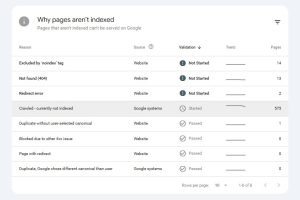
When rendering takes too long or doesn’t complete, Google may show only part of the page, postpone rendering until the next crawl cycle, index a bare-bones version of the page, or not index the page at all. This creates a gap between what visitors see and what search engines actually understand — and that gap is where rankings quietly suffer.
What Is Indexing Delay?
Indexing delay is when Google has already crawled and rendered a page but delays or skips adding it to the search index.
Indexing delays typically appear in Google Search Console as the following:
- “Discovered – currently not indexed”
- “Crawled – currently not indexed”
- URLs that haven’t been crawled in weeks
There are several reasons indexing can take longer than expected, but rendering delay is one of the most common — especially on JavaScript-heavy sites. The crucial insight: indexing delay is often the visible symptom, while rendering delay is the hidden cause underneath it.
Rendering Delay vs Indexing Delay: Key Differences
Understanding the distinction between these two is the key to fixing the right problem.
Aspect |
Rendering Delay |
Indexing Delay |
|
Stage |
Happens during rendering | Happens after rendering |
|
Cause |
JS execution, blocked resources | Quality, duplication, intent |
| Visibility | Hard to detect |
Visible in GSC |
| Impact | Incomplete content understanding |
Page not indexed |
| Fix type | Technical + architectural |
Content + strategy |
Rendering delay is often the root cause, while indexing delay is the symptom. This is why many site owners fix the wrong thing—they focus on content quality (an indexing-delay fix) when the real problem is rendering. Diagnosing which one you’re dealing with saves enormous wasted effort.
Why Rendering Delay Happens on Modern Websites
Rendering delay has several common causes on modern, JavaScript-driven sites.
Cause |
What Happens |
|
Heavy client-side JavaScript |
Google must run large JS bundles before content appears |
|
Interaction-dependent content |
Content loading after scroll/click may never be seen |
|
Blocked JS/CSS resources |
robots.txt rules cause rendering to fail or partially work |
| API dependencies |
Slow or unreliable APIs stall rendering |
| Incorrect lazy loading |
Important content loads too late to be rendered |
The common thread: content that only appears after JavaScript executes, an API responds, or a user interacts. If any of these are slow or fail, search engines may never see the full page. Pure client-side rendering carries the highest risk, because everything depends on JavaScript running successfully.
How Rendering Delay Shows Up in Google Search Console
Rendering delay rarely appears as a clear error. Instead, it shows up in patterns. Common indicators include:
- Pages crawled but not indexed
- Fluctuating indexing numbers
- Pages indexed without all their content
- Internal links discovered later than expected
- Indexed URLs suddenly dropping after JavaScript changes
These symptoms often lead site owners to focus on content quality—when the real problem is rendering. If you’ve improved content repeatedly without indexing improving, rendering delay is worth investigating. The pattern of “Crawled – currently not indexed” on JavaScript-heavy pages is a particularly strong signal.
Why Rendering Delay Confuses Search Engines
Search engines want to index pages that are stable and complete. Rendering delay introduces doubt.
When Google encounters empty containers, missing text, absent links, or incomplete headings during rendering, it may conclude that the page is thin, the page has no value, the content is duplicate, or the page isn’t ready to be indexed yet.
The critical point: Google may not trust the content even though users can see it perfectly. The disconnect between the user’s experience and Google’s rendered view is exactly what causes ranking and indexing problems. Your content can be excellent, but if Google renders an incomplete version, it judges that incomplete version.
A Real-World Pattern of Rendering Delay Impact
I’ve seen sites with thousands of words appear as only a few lines in Google’s rendered HTML sample. In these cases, rankings never stabilized, internal links weren’t being followed, and content updates didn’t help.
After fixing the rendering problems, indexing and rankings improved — without changing the content itself. This is the signature pattern of rendering delay: the content is fine, but search engines can’t see it properly. The fix is technical and architectural, not editorial. Recognizing this pattern saves months of wasted content rewrites that wouldn’t have solved the actual problem.
JavaScript Frameworks and Rendering Delay
Certain frameworks are commonly associated with rendering delay, particularly in specific configurations:
- React (client-side configurations)
- Vue (single-page app setups)
- Angular applications
- Headless CMS frontends
Frameworks themselves aren’t bad for SEO, but how you implement them matters enormously. The same framework can be SEO-friendly with server-side rendering or problematic with pure client-side rendering. The risk isn’t the tool; it’s the rendering strategy. For more on this, see my JavaScript rendering SEO guide.
Rendering Delay and Internal Linking
Rendering delay often disrupts the signals that connect pages to each other. Problems arise when links are injected via JavaScript, loaded only after a user clicks, or hidden behind tabs and accordions.
In these cases, Google might not discover deep pages, pass internal authority effectively, or understand your site’s structure. This compounds indexing and ranking problems—not only is the page’s content incomplete in Google’s view, but the links that would help search engines find and value other pages are also missing. For a complete process, see my internal linking SEO guide.
How to Diagnose Rendering Delay Properly
A systematic diagnosis reveals rendering delay before it harms rankings.
Method |
What It Reveals |
| URL Inspection Tool (rendered HTML) | Compare raw vs rendered HTML—missing content signals delay |
| Mobile-Friendly Test | Shows how Google renders the page, exposes missing content |
| Crawl with JavaScript disabled | If content disappears, it’s inaccessible without JS |
| Analyze load timing | Check whether key content loads late in the page lifecycle |
The simplest test anyone can run: disable JavaScript in your browser and load the page. If your main content, headings, or links disappear, search engines may experience the same problem. For deeper analysis, Google’s URL Inspection Tool lets you compare the raw HTML against the rendered HTML—if critical content appears only after rendering, or not at all, you’ve confirmed a rendering delay issue.
Rendering Delay vs Performance Optimization Conflicts
Ironically, many sites accidentally create rendering delays while trying to improve speed. Common conflicts include:
- Deferring important JavaScript too aggressively
- Lazy-loading above-the-fold content
- Removing server-side rendering
- Over-minifying scripts
The principle to remember: search engines should always be able to see key content, even when you’re optimizing for speed. A page that scores perfectly on speed tests but hides content from crawlers isn’t actually winning. Balance is essential — performance optimization shouldn’t come at the cost of content visibility. For more, see my Core Web Vitals guide.
How Rendering Delay Affects E-E-A-T
Search engines evaluate experience, expertise, authoritativeness, and trust. Rendering delay can hide the very signals that demonstrate these qualities.
If rendering delay obscures author information, headings, structured content, or supporting sections, your E-E-A-T signals weaken—even though they exist for users. The author bio that establishes expertise, the headings that show structure, the supporting content that demonstrates depth — if these only load via delayed JavaScript, search engines may not credit them. Rendering critical E-E-A-T elements server-side protects your credibility signals.
How to Fix Rendering Delay without Harming SEO
1. Use Server-Side Rendering (SSR)
Render important content on the server so Google sees it immediately. This is the most reliable fix—it guarantees content is visible regardless of JavaScript execution.
2. Use Hybrid Rendering
Pre-render critical parts while retaining client-side interactivity. This balances SEO visibility with the interactive experience users expect.
3. Avoid JavaScript-Only Content
Ensure the initial HTML contains important content, headings, and links. Don’t make critical elements dependent solely on JavaScript execution.
4. Prioritize Important Content
Load main content before secondary elements. Critical content should never wait behind less important scripts.
5. Check robots.txt Access
Confirm that JavaScript and CSS files needed for rendering are crawlable. Blocking these resources is a common, easily fixed cause of rendering failure.
When Indexing Delay Is NOT a Rendering Problem
Rendering isn’t the only cause of indexing delays. Before assuming rendering is the issue, rule out other common causes:
- Low content value
- Pages with duplicate intent
- Thin category pages
- Algorithmic quality thresholds
Always verify rendering first before changing your content strategy. Sometimes a page isn’t indexed simply because the content is thin or duplicates another page—not because of rendering. Diagnosing the real cause prevents wasted effort. This connects to my index bloat guide, since low-value pages are a common non-rendering cause of indexing delays.
Rendering Delay and Crawl Budget
Rendering-heavy pages consume more crawl resources. On larger sites, this can reduce crawl frequency, page refresh cycles, and discovery of new content.
Reducing rendering delay often improves crawl efficiency site-wide. When pages render quickly and reliably, search engines can crawl and process more of them in the same time window — leaving more crawl budget for important pages and new content. For more, see my crawl budget guide.
Best Practices to Prevent Rendering Delay Long-Term
Preventing rendering delay is easier than fixing it after the fact. Sustainable practices include:
- Designing for content-focused rendering
- Treating JavaScript as an enhancement, not a dependency
- Testing rendering after every major update
- Avoiding unnecessary frameworks
- Monitoring indexing patterns, not just errors
The core principle: build pages so that critical content is visible without depending on JavaScript. When JavaScript only enhances an already-visible page rather than creating it, rendering delay largely disappears. Testing rendering after framework updates catches problems before they affect rankings.
FAQs
1. What does rendering delay mean in SEO?
Rendering delay in SEO is when search engines have difficulty fully executing JavaScript and displaying all of a page’s content. This can slow down or prevent indexing. It happens during the rendering stage — after crawling but before indexing — and is especially common on JavaScript-heavy websites that load content dynamically.
2. Is rendering delay the same as indexing delay?
No. Rendering delay occurs earlier in the process, during the rendering stage, and often causes indexing delay as a result. Rendering delay is frequently the root cause, while indexing delay is the visible symptom. Fixing rendering delay typically resolves the indexing delay that follows from it.
3. Can rendering delay affect rankings even if a page is indexed?
Yes. Even when a page gets indexed, incomplete rendering can make it harder for search engines to interpret content and internal linking signals, which can hurt rankings. Google may have indexed only a partial version of the page, evaluating it on incomplete information rather than its full content.
4. How do I find out if my site has rendering delay problems?
The quickest test is to disable JavaScript in your browser and load the page—if the main content disappears, search engines may experience the same issue. You can also use Google’s URL Inspection Tool to compare raw HTML versus rendered HTML, which reveals content that’s missing or only appears after rendering.
5. Do JavaScript pages always cause rendering delays?
No. JavaScript configured correctly with server-side rendering typically works well for SEO. The problem isn’t JavaScript itself — it’s pure client-side rendering where content depends entirely on JavaScript executing successfully. With SSR or hybrid rendering, JavaScript-driven sites can be fully SEO-friendly.
6. What’s the difference between crawling, rendering, and indexing?
Crawling is when Googlebot requests a URL and receives its raw HTML. Rendering is when Google executes JavaScript and CSS to build the complete page. Indexing is when Google evaluates the rendered content and decides whether to add it to the search index. Rendering delay disrupts the middle stage, affecting the final indexing.
7. Why does my page show “Crawled – currently not indexed”?
This status often indicates a rendering delay, especially on JavaScript-heavy sites—Google crawled the page but couldn’t render the content reliably enough to index it. However, it can also indicate thin content, duplicate intent, or quality issues. Check rendering first using the URL inspection tool, then evaluate content quality.
8. How do I fix rendering delay without slowing down my site?
Use server-side or hybrid rendering to ensure critical content is in the initial HTML, keep JavaScript and CSS resources crawlable, prioritize loading important content first, and avoid JavaScript-only navigation. These fixes improve search visibility without harming user-facing speed — and often improve both simultaneously.
Final Thoughts
Rendering delay isn’t a minor technical detail — it’s an architectural SEO issue. It changes how search engines read, trust, and index your content. Many sites chase backlinks or new content while the real barrier sits quietly at the rendering stage.
In my experience, fixing rendering delays often delivers outsized improvements. Pages index faster, rankings stabilize, and internal linking starts working as it should — all without rewriting content. The gains come because search engines can finally see your content the way it was meant to be seen.
When you understand the difference between rendering delay and indexing delay, you can solve the real problem instead of just the symptom. Rendering delay is the cause; indexing delay is what you notice. Fixing the cause resolves the symptom—but only if you correctly identify which one you’re dealing with.
In modern SEO, how clearly search engines can see what you publish matters just as much as what you publish. A brilliant page that renders as empty containers helps no one. Getting rendering right ensures your content reaches its full potential in search.
For questions about diagnosing rendering delay on your own site, feel free to reach out through my Contact page.
For more SEO guides, browse Search Engine Realm.
Last Updated: June 2026